Adobe Commerce (Magento): Stay on PaaS, Move to SaaS or Switch Platforms?
If your store runs on Adobe Commerce or Magento 2.4, a decision is coming in the next few months. The most widely used versions are reaching end of support, and Adobe now offers two very different models: the hosted version you know (PaaS) and a cloud service managed by Adobe (SaaS). A third path is to switch platforms.
None of these options is right for everyone. This guide helps you choose based on your situation: what changes with each model, the timeline to respect, what a migration really involves and the questions to settle before you commit.
Published · By Shopflow
- Category:
- Headless commerce and integrations
- Format:
- Article
- Goal:
- Evaluate

Why the question comes up now
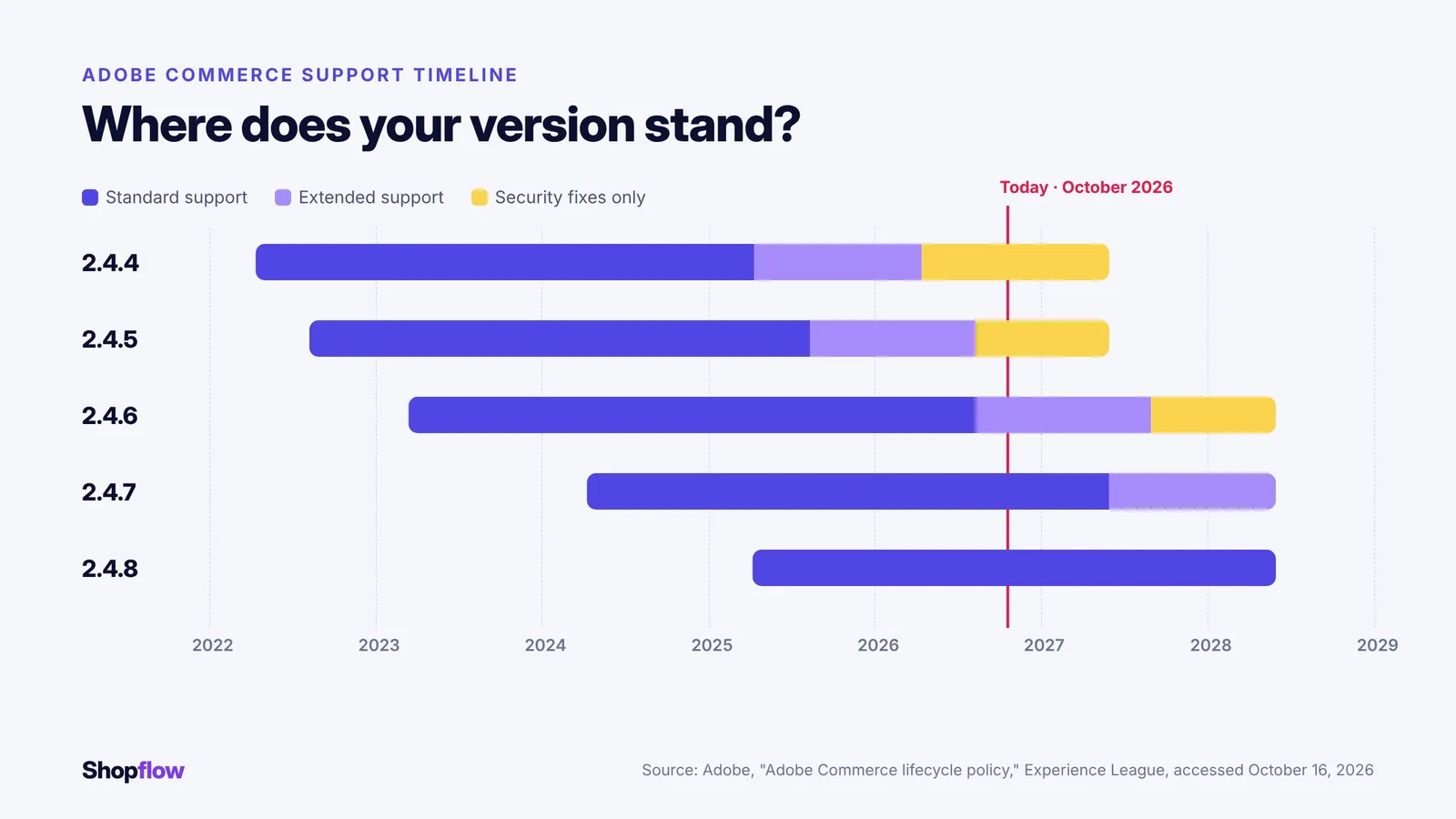
Adobe gives each Adobe Commerce minor version three years of standard support from its general availability date. Versions 2.4.6 and 2.4.7 get an additional year of extended support at no extra cost. After those periods, the version only receives security fixes for a limited time, then nothing at all.
Here is the timeline published by Adobe:
| Version | General availability | End of standard support | End of extended support | End of security-only period |
|---|---|---|---|---|
| 2.4.4 | April 12, 2022 | April 12, 2025 | April 14, 2026 | May 31, 2027 |
| 2.4.5 | August 9, 2022 | August 12, 2025 | August 11, 2026 | May 31, 2027 |
| 2.4.6 | March 14, 2023 | August 11, 2026 | August 31, 2027 | May 31, 2028 |
| 2.4.7 | April 9, 2024 | May 31, 2027 | May 31, 2028 | Not applicable |
| 2.4.8 | April 8, 2025 | May 31, 2028 | To be determined | Not applicable |
In practice, a store still on 2.4.4 or 2.4.5 is already past the end of its extended support. A store on 2.4.6 left standard support in August 2026. In every case, an upgrade, a migration or a platform change takes months to prepare. It is better to decide now than under the pressure of a deadline.
Option 1: Stay on Adobe Commerce PaaS
The PaaS model (Adobe Commerce on Cloud) is the one most businesses use today. Adobe notes that on-premise installations offer similar capabilities.
What you keep
- Full customization, including PHP, from the data model to the admin.
- PHP extensions from the Magento Marketplace.
- Native customization of search and email.
- An environment dedicated to your business.
What you keep carrying
- Upgrades and patches, which remain manual. Each new minor version means an upgrade project, with testing of your extensions and customizations.
- Compatibility of every extension at every upgrade.
- An in-house team or partner with ongoing Magento expertise.
This option fits if your store relies on deep customizations you don't want to rebuild, you have a stable Magento team, and the cost of regular upgrades seems acceptable.
Option 2: Move to Adobe Commerce as a Cloud Service (SaaS)
The SaaS model is Adobe's answer to the upgrade burden. Adobe's documentation describes how it differs from PaaS.
What you gain
- Automatic, versionless updates managed by Adobe.
- Cloud infrastructure that scales across the full stack.
- Less technical operations work on your side.
What changes, and what you need to plan for
- Customization happens only outside the platform, through APIs, events and App Builder. In-process PHP code is no longer possible.
- PHP extensions from the Magento Marketplace are not carried over. Only App Builder apps are available.
- Search requires a third-party solution, and only standard email templates are offered.
- Data storage for your customizations is limited. The database is listed as an early-access feature.
- The availability commitment is 99.9% for both infrastructure and application, compared with 99.99% and 99.9% for PaaS with managed services.
This option fits if you want to stay in the Adobe ecosystem, your customizations can be rebuilt as external apps, and reducing maintenance matters more to you than customization freedom.
One point is often underestimated: moving from PaaS to SaaS is not a simple upgrade. Your extensions and part of your customizations must be replaced or rebuilt. It is a migration project in its own right.
Option 3: Switch platforms
Since moving to SaaS already means rebuilding part of the store, many businesses take the opportunity to compare other platforms. The question is no longer "how do we upgrade Magento?" but "which platform best fits our needs for the next five years?"
This option is worth exploring if:
- your Magento maintenance costs are rising faster than the value they deliver;
- your store serves several audiences (consumers, resellers, key accounts) and your B2B rules are hard to maintain;
- you want a more modern interface without rebuilding everything at once;
- your Magento team is small or depends on a single person.
It also comes with constraints: a new platform to learn, integrations to redo and a migration project to run. Switching platforms does not erase the cost of migration. It only lets you choose what you invest in.
The three options side by side
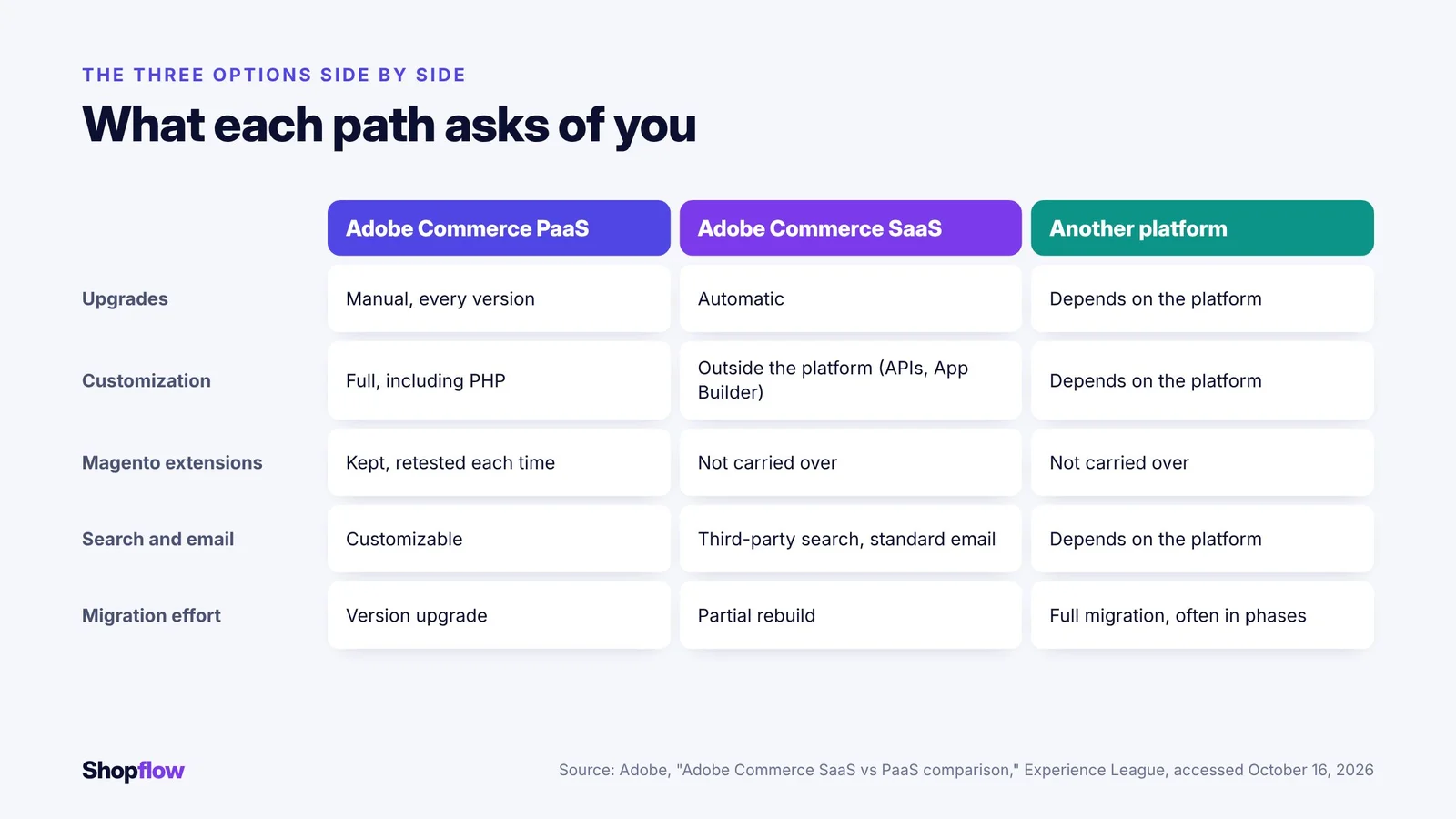
| Criterion | Adobe Commerce PaaS | Adobe Commerce SaaS | Another platform |
|---|---|---|---|
| Upgrades | Manual, every version | Automatic, managed by Adobe | Depends on the platform |
| Customization | Full, including PHP | Outside the platform only (APIs, events, App Builder) | Depends on the platform |
| Existing Magento extensions | Kept, tested at every upgrade | Not carried over | Not carried over |
| Search and email | Natively customizable | Third-party search, standard email templates | Depends on the platform |
| Migration effort | Version upgrade | Partial rebuild | Full migration, often in phases |
| Team required | Ongoing Magento expertise | API and App Builder developers | Depends on the platform |
The last column only makes sense for a specific platform. To compare, fill it in with each vendor's written answers, not with their sales pages.
What a migration really involves
Whichever option you choose, leaving your current setup affects more than the storefront. Here is what to inventory before asking for a quote.
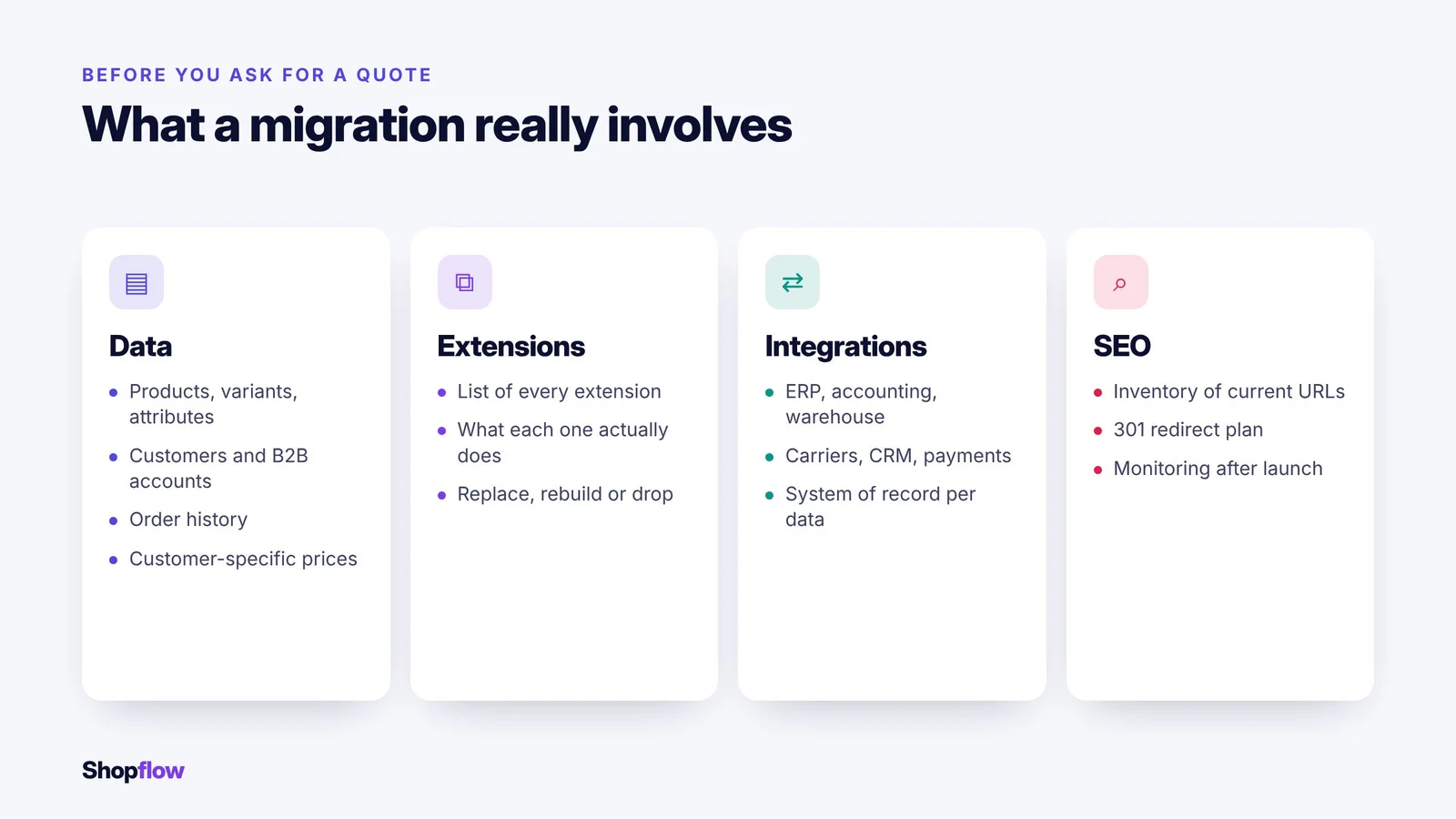
Data
- Products, variants, attributes and categories.
- Customers and B2B accounts, with their addresses, roles and terms.
- Order history, to be retained according to your accounting obligations.
- Prices, promotions and customer-specific agreements.
Extensions and customizations
- A list of every installed extension and what it actually does. Some are no longer used.
- For each one, three options: replace it with a native feature, rebuild it or drop it.
Integrations
- ERP, accounting, warehouse management, carriers, CRM, payments.
- The direction of each exchange and the system of record for each piece of data.
SEO
- A list of your current URLs and a 301 redirect plan to the new ones.
- Keeping the titles, descriptions and content of the pages that drive traffic.
- Close monitoring of rankings and indexing errors in the weeks after launch.
A migration that neglects this last point can lose, in a few days, organic traffic built over several years.
Migrate all at once or in phases
A full switchover over a single weekend looks simpler. Yet it concentrates every risk into one moment.
A phased approach is often safer for an established store:
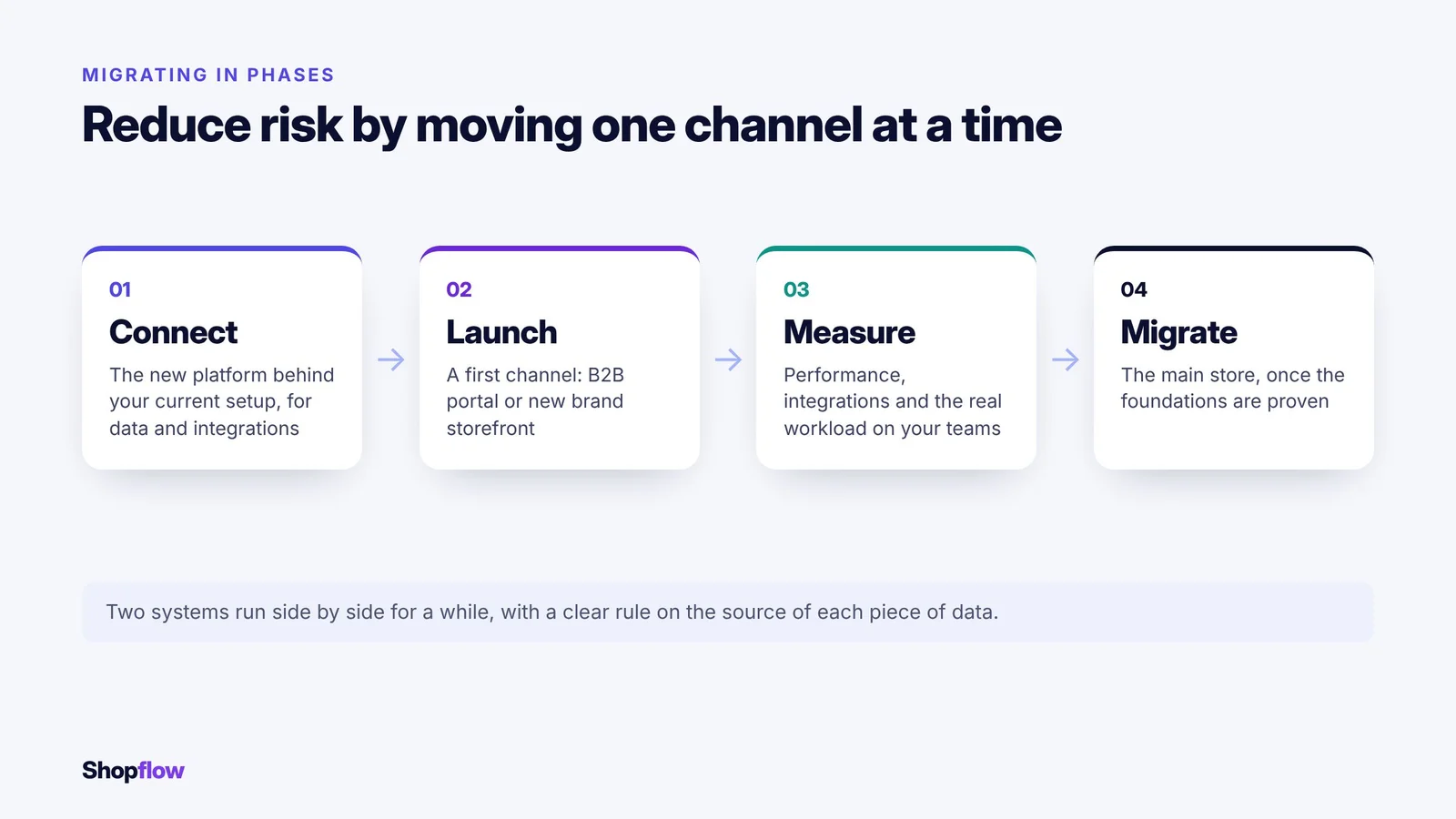
- Connect the new platform behind your current setup, for data and integrations.
- Launch a first channel, such as a B2B portal or a new brand storefront.
- Measure performance, integrations and the real workload on your teams.
- Migrate the main store once the foundations are proven.
This approach means running two systems side by side for a while, with clear rules on the source of each piece of data. In return, it lets you adjust course before your entire revenue depends on it.
Six questions to decide
- Which version are you running, and when is its next support deadline?
- What have your upgrades cost you in time, budget and disruption over the last three years?
- Which customizations are truly strategic, and which could be replaced by a standard feature?
- Which audiences do you serve, and are your B2B rules easy to maintain today?
- What team will you have in three years to maintain the platform you choose?
- What annual budget do you expect after launch, not just for the project?
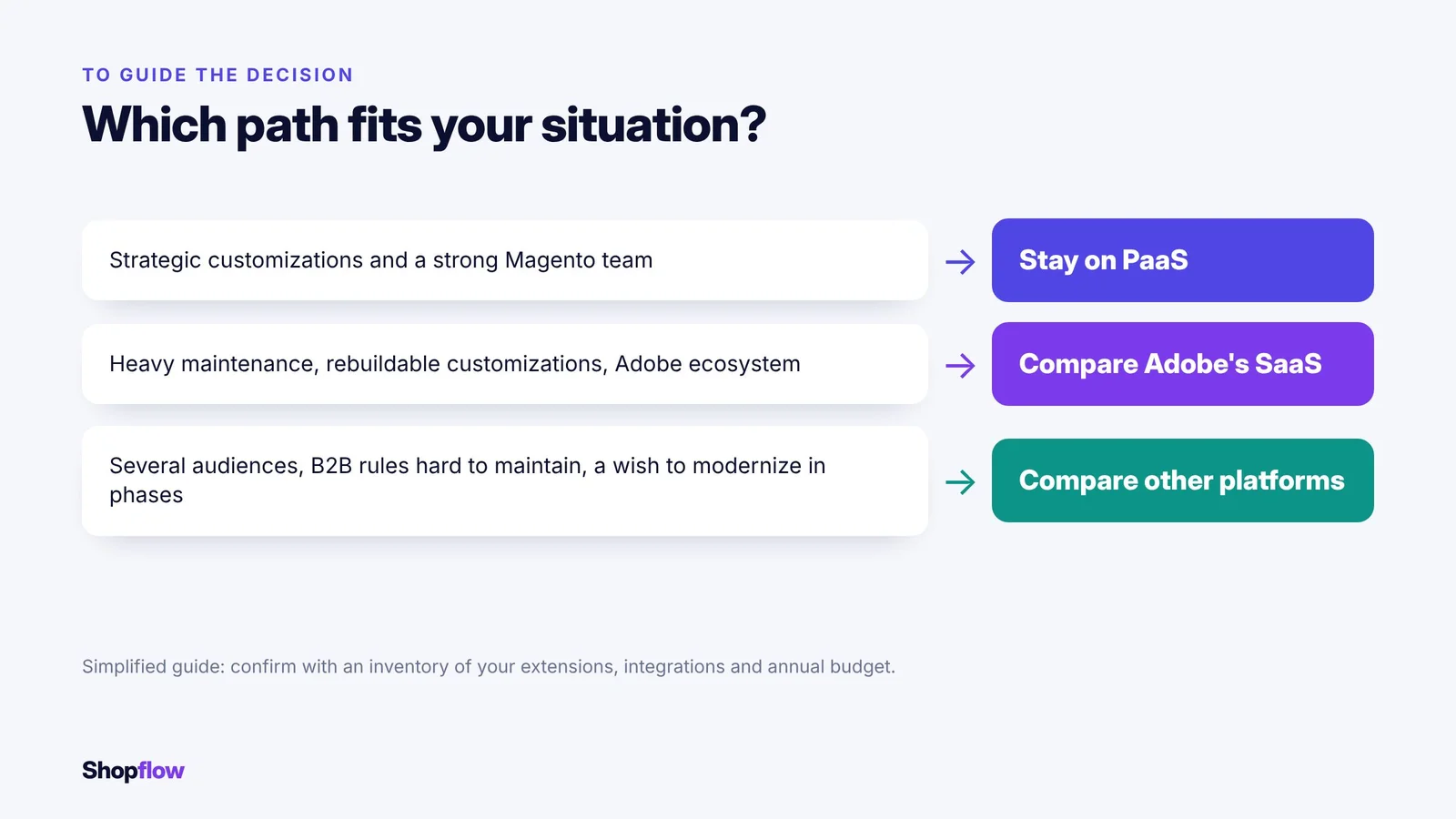
If your answers point to strategic customizations and a strong Magento team, staying on PaaS may be the most rational choice. If maintenance weighs on you and your customizations can be rebuilt, Adobe's SaaS or another platform deserves a serious comparison.
Where does Shopflow fit?
Shopflow is one of the platforms worth considering for option 3, especially for businesses that sell to both consumers and professional customers. The platform is headless: the engine exposes its functions through REST and GraphQL APIs, with webhooks for exchanges with your systems. Its B2B engine handles customer- or contract-specific pricing, private catalogues, approvals and payment terms. Migration can happen in phases, by connecting Shopflow behind your current site before migrating the main store.
Like any platform, Shopflow does not carry over your Magento extensions: some functions will be native, others will need to be rebuilt. Our team knows Magento, which helps make that inventory accurate.
Next step: to find out what a migration would involve for your store, you can ask the Shopflow team for an inventory of your extensions, integrations and data.
Related pages
- B2B EngineCustomer-specific pricing, private catalogues, approvals and payment terms.
- Headless CommerceThe APIs and channel-by-channel migration described by Shopflow.
- Replatforming and SEOThe article on switching platforms without losing search rankings.
- Headless commerceThe guide to deciding whether headless commerce is right for you.
Frequently asked questions
Does my Magento store keep working after end of support?
Yes, the store does not stop. But it no longer receives quality fixes, then no longer receives security fixes, which increases risk over time.
Is moving to Adobe's SaaS a simple upgrade?
No. The SaaS model does not accept PHP extensions from the Magento Marketplace or in-process PHP customization. Part of the store must be rebuilt.
Does a migration hurt SEO?
Not if it is prepared. A 301 redirect plan, keeping the content of key pages and monitoring after launch limit the losses.
How long does a migration take?
It depends on the number of extensions, integrations and audiences. A phased migration lets you put a first channel live before everything is migrated.
Can we keep our order history?
Yes, in most cases. You do need to decide what to migrate and what to archive, based on your accounting obligations and customer service needs.
Sources consulted
- Adobe Experience League: Adobe Commerce lifecycle policy (accessed October 16, 2026) (opens in a new tab)
- Adobe Experience League: Adobe Commerce SaaS vs PaaS comparison (accessed October 16, 2026) (opens in a new tab)